
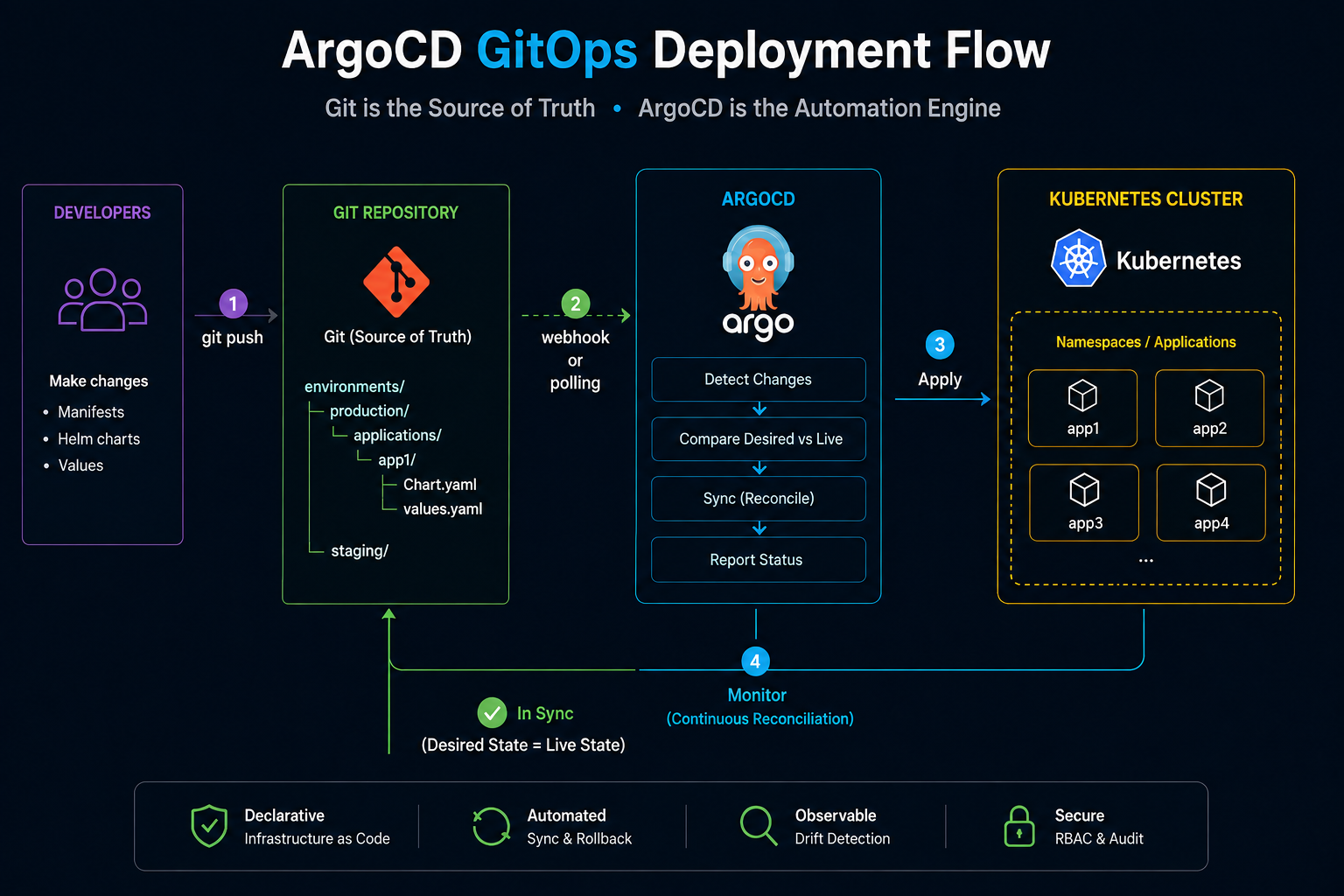
Argo CD is a GitOps continuous delivery tool for Kubernetes. In simple terms, it watches the desired state stored in Git, compares it with what is actually running in the cluster, and syncs the cluster when the two drift apart.
An Argo CD Application describes something that should be deployed. An ApplicationSet sits one level above that and can generate many Applications from a pattern, such as files or directories in a Git repository.
For this setup, I wanted the GitOps repository to answer a fairly simple question: what is actually running on this cluster?
The repository is directory-driven: an application exists because a directory exists. Each application directory contains a small app.yaml, Helm values when it has a chart, and optionally some encrypted secrets. ApplicationSets scan those directories and generate the Argo CD Applications automatically.
There are no per-service entries inside the ApplicationSets. Adding a service usually means adding a directory and committing it.
For secrets, I originally used SOPS through an Argo CD config-management plugin. I later moved to Sealed Secrets for a tighter security boundary: I did not want Argo CD’s repo-server to need decryption capability or access to decryption key material. With Sealed Secrets, Argo CD only applies encrypted SealedSecret resources from Git, and the controller inside the cluster creates the actual Kubernetes Secrets.
The result is a setup with fewer moving parts and a clearer separation of responsibilities.
At a high level, the flow looks like this:
Git repository
     |
     v
Root Application
     |
     +-- AppProjects
     |
     +-- ApplicationSets
              |
              v
         Applications
          |       |
          v       v
        Helm   SealedSecrets
          |       |
          +---+---+
              |
              v
           Cluster
Repository layout#
The Argo CD part of the repository looks roughly like this:
argocd/
├── root.yaml
├── projects/
│   ├── production.yaml
│   ├── development.yaml
│   └── platform.yaml
├── applicationsets/
│   ├── production.yaml
│   ├── development.yaml
│   └── platform.yaml
├── charts/
│   ├── related-charts-to-this-project/
│   └── .../
├── environments/
│   ├── prod/
│   │   └── <namespace>/<service>/
│   │       ├── app.yaml
│   │       ├── values.yaml
│   │       └── secrets/
│   └── dev/
│       └── <namespace>/<service>/
└── platform/
    └── <namespace>/<service>/
        ├── app.yaml
        ├── values.yaml
        └── secrets/
There are two application trees because they have different lifecycles.
environments/ contains business applications. Production and development are separate, with development deployed into -dev namespaces on the same cluster. The development environment lives under environments/dev/ and uses the development AppProject.
platform/ contains things that belong to the cluster rather than to one application environment: monitoring, dashboards, access management, Sealed Secrets itself, and similar services.
The rest is control-plane configuration:
root.yamlbootstraps Argo CD.projects/defines where each class of application is allowed to deploy.applicationsets/discovers application directories.charts/contains platform-owned Helm charts that belong to this repository. Business application charts normally live in their application repositories.
The important part is that the root Application never recursively deploys everything under argocd/. It only manages the projects and ApplicationSets.
The root Application#
The root Application is the only Argo CD Application I apply manually.
apiVersion: argoproj.io/v1alpha1
kind: Application
metadata:
  name: platform-gitops
  namespace: system
  finalizers:
    - resources-finalizer.argocd.argoproj.io
spec:
  project: default

  source:
    repoURL: git@bitbucket.org:your-org/platform-gitops.git
    targetRevision: master
    path: argocd
    directory:
      recurse: true
      include: '{projects,applicationsets}/*.yaml'

  destination:
    server: https://kubernetes.default.svc
    namespace: system

  syncPolicy:
    automated:
      selfHeal: true
      prune: false
    syncOptions:
      - CreateNamespace=false
The include is important.
Without it, the root would walk into charts/, environments/, and platform/ and try to treat application values, encrypted secrets, and Helm templates as resources belonging to the root Application.
Instead, the root owns only:
projects/*.yaml
applicationsets/*.yaml
The ApplicationSets own everything below them.
I also deliberately leave prune disabled on the root.
Pruning is useful for normal applications, but the root sits above the objects that generate every other application. Accidentally removing an ApplicationSet from git should not immediately turn into a cascade of deleted workloads.
Generated applications are different: they have pruning enabled because their desired state really is defined by the corresponding application directory.
Bootstrapping becomes:
# Install Argo CD itself first.
helm upgrade --install argocd argo/argo-cd --version x.y.z -f values.yml -n system --create-namespace
# Then hand control to git.
cd ../../../..
kubectl apply -f argocd/root.yaml
After that, changes normally happen through the repository.
Projects are the boundary#
I used the default project for almost everything when I first started using Argo CD. It is convenient, but it becomes less attractive once one Argo CD installation manages production applications, development applications, monitoring, system services, and cluster-level resources.
I now keep three projects:
production
development
platform
The production project can deploy business applications only to production namespaces. Development gets the corresponding -dev namespaces through the development AppProject. Platform gets namespaces such as monitoring, system, and users.
A simplified production project looks like this:
apiVersion: argoproj.io/v1alpha1
kind: AppProject
metadata:
  name: production
  namespace: system
  annotations:
    argocd.argoproj.io/sync-wave: "-1"

spec:
  sourceRepos:
    - git@bitbucket.org:your-org/platform-gitops.git
    - git@bitbucket.org:your-org/app1.git
    - https://charts.example.com

  destinations:
    - server: https://kubernetes.default.svc
      namespace: namespace1
    - server: https://kubernetes.default.svc
      namespace: namespace2

  clusterResourceWhitelist:
    - group: ""
      kind: Namespace
      name: namespace1
    - group: ""
      kind: Namespace
      name: namespace2

  namespaceResourceWhitelist:
    - group: "*"
      kind: "*"
The sync wave makes the projects appear before the ApplicationSets that reference them.
The project also acts as a repository allow-list. An application cannot suddenly start pulling a chart from some unrelated Helm repository just because somebody changed app.yaml.
I prefer explicitly listing repositories rather than using:
sourceRepos:
  - "*"
The platform project is intentionally more permissive in terms of resource kinds because platform charts sometimes need things such as:
ClusterRole
ClusterRoleBinding
CustomResourceDefinition
The business projects do not.
That separation is useful because a normal application should not need permission to install CRDs or create cluster-wide RBAC.
One version detail matters here: this repository currently installs Argo CD with Helm chart 10.2.2 (Argo CD v3.4.6). The name field used to restrict entries in clusterResourceWhitelist is supported in current Argo CD, but older Argo CD versions did not support name-scoped cluster-resource restrictions. If you run an older version, check its AppProject schema before copying that part of the example.
Discovering applications#
The ApplicationSets use the Git file generator.
Production scans:
files:
  - path: argocd/environments/prod/*/*/app.yaml
So this:
argocd/environments/prod/namespace1/app1/app.yaml
becomes an Argo CD Application automatically.
The directory path provides most of the information:
argocd
environments
prod
namespace1
app1
Segment 3 is the Kubernetes namespace, and the basename is the service name.
That lets the ApplicationSet create:
Application: app1-namespace1-prod
Namespace:   namespace1
Helm release: app1
Project:     production
There is nothing called app1 inside the ApplicationSet itself.
Here is the relevant part of the production ApplicationSet:
apiVersion: argoproj.io/v1alpha1
kind: ApplicationSet
metadata:
  name: production
  namespace: system

spec:
  goTemplate: true
  goTemplateOptions: ["missingkey=error"]

  generators:
    - git:
        repoURL: git@bitbucket.org:your-org/platform-gitops.git
        revision: master
        files:
          - path: argocd/environments/prod/*/*/app.yaml

  template:
    metadata:
      name: '{{ .path.basename }}-{{ index .path.segments 3 }}-prod'
      namespace: system
      finalizers:
        - resources-finalizer.argocd.argoproj.io
    spec:
      project: production
      destination:
        server: https://kubernetes.default.svc
        namespace: '{{ index .path.segments 3 }}'
      syncPolicy:
        automated:
          selfHeal: true
          prune: true
        syncOptions:
          - CreateNamespace=true
          - ApplyOutOfSyncOnly=true

  templatePatch: |
    spec:
      sources:
      {{- if eq .source.type "git" }}
        - repoURL: {{ .source.repoURL | quote }}
          targetRevision: {{ .source.targetRevision | quote }}
          path: {{ .source.path | quote }}
          helm:
            releaseName: {{ .path.basename | quote }}
            valueFiles:
              - {{ printf "$values/%s/values.yaml" .path.path | quote }}
      {{- else if eq .source.type "helm" }}
        - repoURL: {{ .source.repoURL | quote }}
          chart: {{ .source.chart | quote }}
          targetRevision: {{ .source.targetRevision | quote }}
          helm:
            releaseName: {{ .path.basename | quote }}
            valueFiles:
              - {{ printf "$values/%s/values.yaml" .path.path | quote }}
      {{- end }}
      {{- if ne .source.type "none" }}
        - repoURL: git@bitbucket.org:your-org/platform-gitops.git
          targetRevision: master
          ref: values
      {{- end }}
      {{- if .secrets.enabled }}
        - repoURL: git@bitbucket.org:your-org/platform-gitops.git
          targetRevision: master
          path: {{ printf "%s/secrets" .path.path | quote }}
          directory:
            include: '*.sealed.yaml'
      {{- end }}
The file generator discovers app.yaml and exposes both its fields (.source.*, .secrets.*) and the path metadata (.path.*). The template defines the parts shared by every generated Application, while templatePatch builds spec.sources dynamically.
For source.type: git, the first source is a Helm chart at a path in a Git repository. For source.type: helm, it is a chart from a Helm repository. Both add the GitOps repository as ref: values so Helm can load the environment-specific values.yaml. When secrets.enabled is true, a separate directory source applies only secrets/*.sealed.yaml. With source.type: none, the chart and $values sources are skipped, so the Application contains only the SealedSecret source. In practice, type: none therefore only makes sense with secrets.enabled: true.
The development ApplicationSet uses the same patch but changes the Helm release to <service>-dev and the destination namespace to <namespace>-dev. Its applications live under environments/dev/ and use the development AppProject. The platform ApplicationSet also uses the same source assembly, but its namespace is path segment 2 because its directories are one level shallower.
missingkey=error is worth keeping. A typo in app.yaml should fail visibly instead of quietly generating a half-correct Application. Because the template references .secrets.enabled, every app.yaml should define that field explicitly, even when it is false.
The generated Applications also have the Argo CD resources finalizer. When an Application really is removed, Argo CD cleans up the resources it owns rather than leaving an orphaned release behind.
app.yaml stays intentionally small#
I don’t want every service directory to contain a complete Argo CD Application manifest.
It only needs to answer two questions:
- Where does the chart come from?
- Does this application have Sealed Secrets?
For a business application chart stored in its application repository:
source:
  type: git
  repoURL: git@bitbucket.org:your-org/app1.git
  targetRevision: main
  path: helm/app1

secrets:
  enabled: false
Platform-owned charts can still use the same git source type while pointing to a path under argocd/charts/ in the GitOps repository.
For an upstream Helm chart:
source:
  type: helm
  repoURL: https://grafana.github.io/helm-charts
  chart: grafana
  targetRevision: "10.5.13"

secrets:
  enabled: false
There is also a third type:
source:
  type: none

secrets:
  enabled: true
That one looks strange until you have resources that do not need a chart at all.
I use it for small shared Applications whose only job is owning something like a namespace-wide registry pull secret.
No fake Helm chart. No empty templates. Just the encrypted resource.
Building a multi-source Application#
The ApplicationSet turns that small file into an Argo CD multi-source Application.
For a business application chart stored in its application repository:
- repoURL: git@bitbucket.org:your-org/app1.git
  targetRevision: main
  path: helm/app1
  helm:
    releaseName: app1
    valueFiles:
      - $values/argocd/environments/prod/namespace1/app1/values.yaml

- repoURL: git@bitbucket.org:your-org/platform-gitops.git
  targetRevision: master
  ref: values
The first source is the Helm chart, which can come from the application repository or from a platform-owned chart in the GitOps repository. The second gives the Application a $values reference back to the GitOps repository. This keeps the reusable chart with its owner while each environment keeps its own values next to its own app.yaml.
For an upstream Helm chart, only the first source changes:
- repoURL: https://grafana.github.io/helm-charts
  chart: grafana
  targetRevision: "10.5.13"
  helm:
    releaseName: grafana
    valueFiles:
      - $values/argocd/platform/monitoring/grafana/values.yaml
I like this better than copying third-party charts into the repository just to attach my own values to them.
Secrets with Sealed Secrets#
I used to handle encrypted secrets with SOPS through an Argo CD config-management plugin. It worked, but it meant the repo-server needed the plugin and the ability to decrypt secret material during manifest generation.
I moved to Bitnami Sealed Secrets mainly to reduce that security exposure. Argo CD no longer needs to decrypt anything or hold the corresponding private key. It only sees and applies encrypted Kubernetes resources; decryption happens inside the cluster through the Sealed Secrets controller.
An application that needs secrets looks like this:
grafana/
├── app.yaml
├── values.yaml
└── secrets/
    ├── admin.sealed.yaml
    ├── db.sealed.yaml
    └── oauth.sealed.yaml
When:
secrets:
  enabled: true
the ApplicationSet adds another source:
- repoURL: git@bitbucket.org:your-org/platform-gitops.git
  targetRevision: master
  path: argocd/platform/monitoring/grafana/secrets
  directory:
    include: '*.sealed.yaml'
There is no decryption step in Argo CD; to it, these are just normal Kubernetes manifests.
A file in that directory contains a resource such as:
apiVersion: bitnami.com/v1alpha1
kind: SealedSecret
...
Argo CD applies it, and the Sealed Secrets controller running in the cluster decrypts it and creates the real Kubernetes Secret.
That separation is much cleaner:
Argo CD
  |
  | applies encrypted manifest
  v
SealedSecret
  |
  | controller decrypts
  v
Secret
The private key never needs to exist in the GitOps repository or inside Argo CD’s repo-server.
Sealing secrets#
The controller’s public certificate can safely be committed to the repository.
That means I can seal a Secret without needing access to the controller’s private key or even a live connection to the cluster. I keep the public certificate in the repository and pass it to kubeseal explicitly.
The workflow is roughly:
kubeseal \
  --cert argocd/platform/system/sealed-secrets/sealing-cert.pem \
  --format yaml \
  < ~/temp-secret.yaml \
  > secrets/registry.sealed.yaml

rm ~/temp-secret.yaml
Only the public certificate and the resulting .sealed.yaml file go into git. The private sealing key does not. The ApplicationSet uses include: '*.sealed.yaml', so these files are expected directly under the application’s secrets/ directory rather than in nested subdirectories.
With the default strict scope, the sealed value is tied to the Secret’s name and namespace. A secret sealed for:
namespace1
cannot simply be copied to:
namespace1-dev
and decrypted there.
That is actually useful for this layout. Production and development keep separate encrypted secrets even if the applications otherwise look identical.
I also keep a chart-less shared Application in namespaces that need a common registry pull secret:
environments/prod/namespace1/shared/
└── secrets/
    └── registry.sealed.yaml
Its app.yaml is just:
source:
  type: none

secrets:
  enabled: true
That gives the shared Secret a single owner instead of having every application try to create the same resource.
One operational consequence is that the controller’s sealing keys become part of the cluster’s disaster-recovery state. I do not store the private keys in the GitOps repository, but I do back them up separately and securely. Without those keys, a completely rebuilt cluster would not be able to decrypt the existing SealedSecret resources already committed to git.
Adopting existing releases safely#
Production keeps the Helm release name unsuffixed so an existing release such as app1 can be brought under Argo CD without creating a parallel app1-prod release. I also configure Argo CD to track managed resources by annotation:
configs:
  cm:
    application.resourceTrackingMethod: annotation
This matters during adoption because many Helm charts use app.kubernetes.io/instance in selectors. Annotation-based tracking lets Argo CD add its own tracking metadata without repurposing that label. Before syncing an existing production release, I pin the chart to the version already running and check argocd app diff first. The initial adoption diff should not contain a pod-template change unless I actually intend to roll the workload.
Production, development, and platform#
Production and development intentionally use almost the same generator.
Production:
environments/prod/namespace1/app1
becomes:
Application: app1-namespace1-prod
Namespace:   namespace1
Release:     app1
Development:
environments/dev/namespace1/app1
becomes:
Application: app1-namespace1-dev
Namespace:   namespace1-dev
Release:     app1-dev
The -dev suffix used by development matters because both environments run on the same cluster.
Production is deliberately left unsuffixed. That was particularly useful when moving existing workloads under Argo CD: if the live Helm release was already called app1, changing the GitOps version to app1-prod would effectively create a different Helm release.
Keeping the existing name lets Argo CD take over the resources that are already there.
Platform applications are one level shallower:
platform/<namespace>/<service>
For example:
platform/monitoring/grafana
becomes:
Application: monitoring-grafana
Namespace:   monitoring
Release:     grafana
Project:     platform
There is no environment suffix because there is only one cluster-level Grafana in this setup.
Adding a new application#
Most of the complexity is now in the platform rather than in the process of adding an application.
For a normal service:
argocd/
└── environments/
    └── prod/
        └── namespace1/
            └── new-service/
                ├── app.yaml
                └── values.yaml
If it needs encrypted secrets:
new-service/
├── app.yaml
├── values.yaml
└── secrets/
    └── something.sealed.yaml
Then:
- Choose the chart source in
app.yaml. - Add the service’s
values.yamlif it uses a Helm chart. A chart-lesssource.type: noneApplication does not need one. - Add Sealed Secrets if needed; for
source.type: none,secrets.enabledshould betrue. - If this is a new namespace, allow it in the appropriate AppProject.
- If the chart comes from a new repository, add that repository to the project’s
sourceRepos. - Register credentials with Argo CD if the repository is private.
- Commit and push.
There is no Application manifest to write.
There is no ApplicationSet entry to add.
The presence of:
<namespace>/<service>/app.yaml
is the inventory entry.
Conclusion#
The goal of this setup is to keep Argo CD predictable as the number of applications grows.
ApplicationSets discover applications from the repository structure, AppProjects define where they are allowed to deploy, and Helm keeps the deployment logic reusable across environments. Sealed Secrets keeps encrypted secrets in Git without giving Argo CD access to the decryption keys.
I also keep a clear boundary between reusable deployment logic and environment-specific state. When a business application ships its own Helm chart, that chart stays with the application repository. Platform-owned or shared charts can live under argocd/charts/, and third-party charts come directly from their Helm repositories. The GitOps repository owns the environment-specific state: which chart revision to deploy, the production or development values, namespaces, and the corresponding SealedSecret manifests.
The useful rule is that reusable charts stay with their owner, while values and secrets follow the environment and deployment.
The main benefit is that most application-specific deployment configuration stays close to the environment that owns it. Adding a new service does not require modifying a central list of Applications or expanding an ApplicationSet with another entry. The repository structure becomes the source of truth, while Argo CD continuously reconciles that structure with the cluster.
There are still a few things that require explicit configuration, such as allowing new namespaces or repositories in an AppProject, but the normal path remains simple: add the application directory, define its source and values, add any Sealed Secrets it needs, commit the change, and let Argo CD handle the deployment.